A manual for writers of research papers, theses, and dissertations, 7th edition - Kate L. Turabian 2007
Take notes systematically - Create templates for notes
Engaging sources
Part I. Research and writing: from planning to production
Like the other steps in a research project, note-taking goes better with a plan.
4.2.1 Create templates for notes
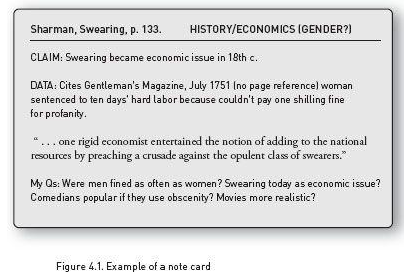
You will take notes more reliably if you set up a system that encourages you to think beyond the mere content of your sources by analyzing and organizing that content into useful categories. A few instructors still recommend taking notes in longhand on 3 × 5 cards, as in figure 4.1. A card like that may seem old-fashioned, but it provides a template for efficient note-taking, even if you take notes on a laptop. (Start a new page for each general idea or claim that you record from a source.) Here is a plan for such a template:
 At the top of each new page, create a space for bibliographic data (author, short title, page number).
Create another space at the top for keywords (see upper right above). Those words will later will let you sort and re-sort your notes by subject matter (for more on keywords, see 4.3.4).
Create different places on each new page for different kinds of notes. You might even label the places (see fig. 4.1, with places for a Claim, Data, and My Qs).
In particular, create a section specifically dedicated to your own responses, agreements, disagreements, speculations, and so on. That will encourage you to do more than simply record the content of what you read.
When you quote the words of a source, record them in a distinctive color or font size and style so that you can recognize quotations at a glance, and enclose them in large quotation marks in case the file loses its formatting.
When you paraphrase a passage (see 4.2.2), record the paraphrase in a distinctive color or font so that you can't possibly mistake it for your own ideas, and enclose it in curly brackets (in case the file loses its formatting).
If you can't take notes directly on a computer, make paper copies of the template.